Enrolment, redesigned
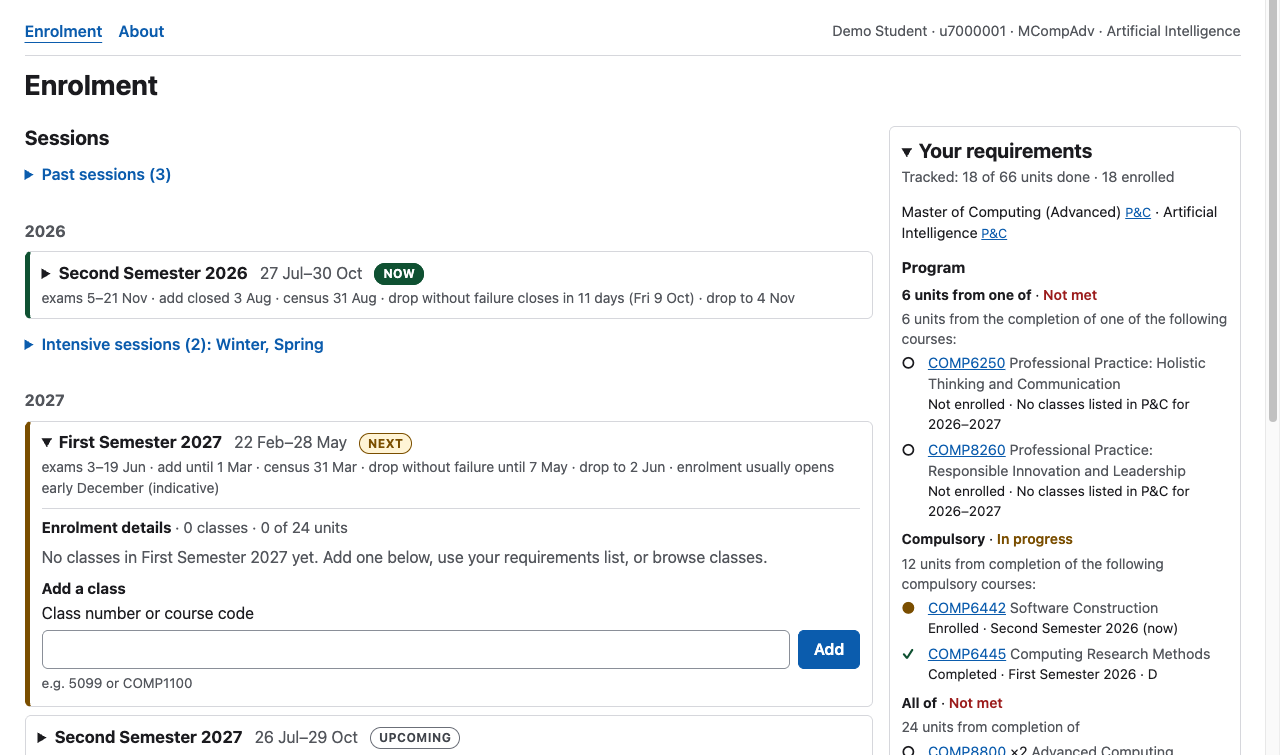
A working prototype of ANU’s class enrolment page (ANUHub, formerly ISIS), rebuilt as one page: add a class by its class number or its course code, browse every class in a filterable table, see which session is on now and which one you are enrolling for, unfold a session’s enrolment details in place, and keep your program’s requirements beside you while you do it. Every course fact on the page comes from ANU’s public Programs & Courses site; the demo student is the only invented data.
Live: https://comp4020-crit7-rangermix.fly.dev
What good looks like here
A student should get from “I need COMP8800 next semester” to enrolled without leaving the page and without looking up a class number, and at every moment the page should answer three questions at a glance: which session am I enrolling in? what am I enrolled in? what do I still need?
The design started from the current flow, looked at read-only in a signed-in ANUHub session and in ANU’s own enrolment guides. Adding one class there takes six or more screens that replace each other: a session list with no dates, a class list with titles cut at about forty characters and no unit total, an Add Class form that takes class numbers only, a search that demands a career and a subject area, and a Continue-then-Save wizard. The redesign’s answers:
| ANUHub today | This prototype |
|---|---|
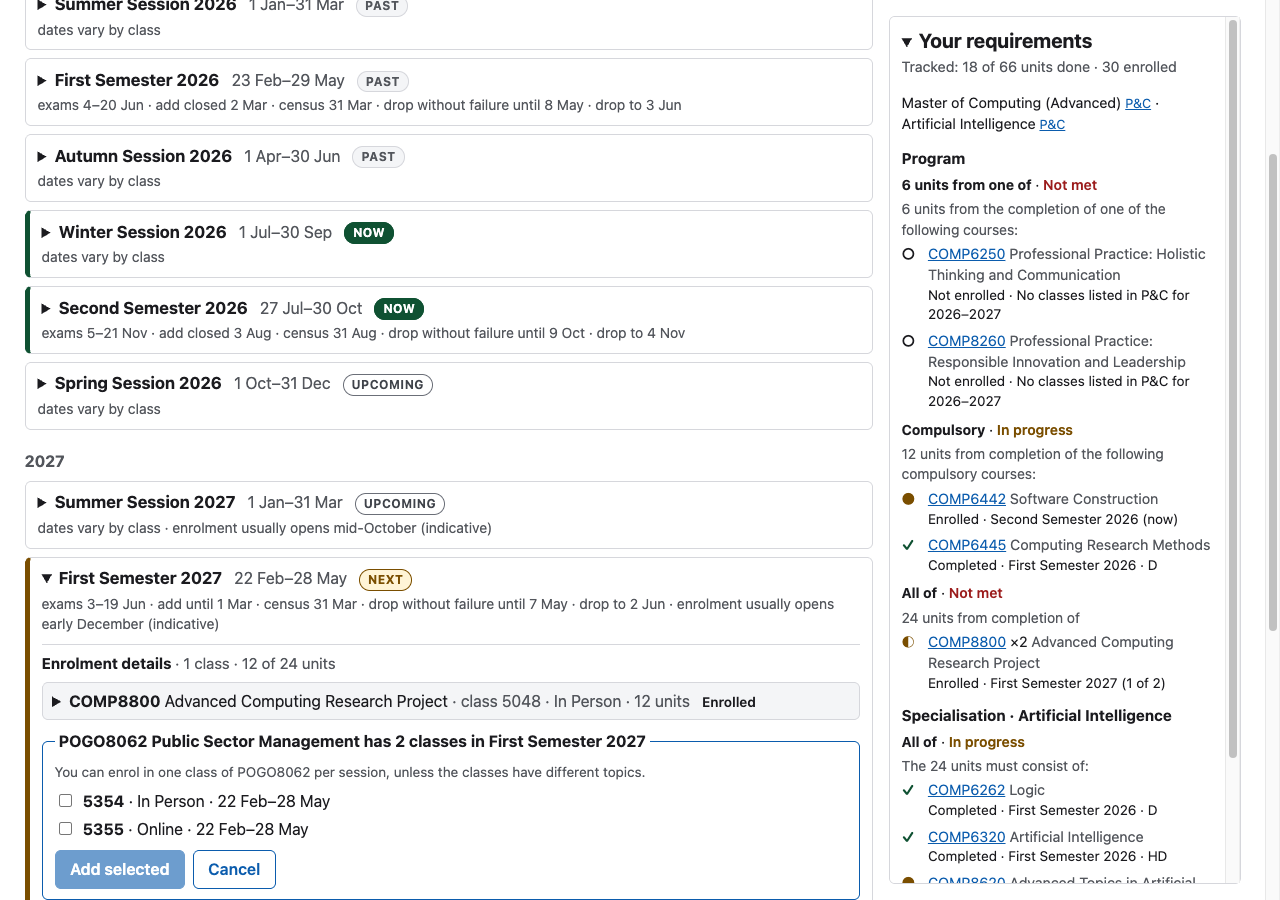
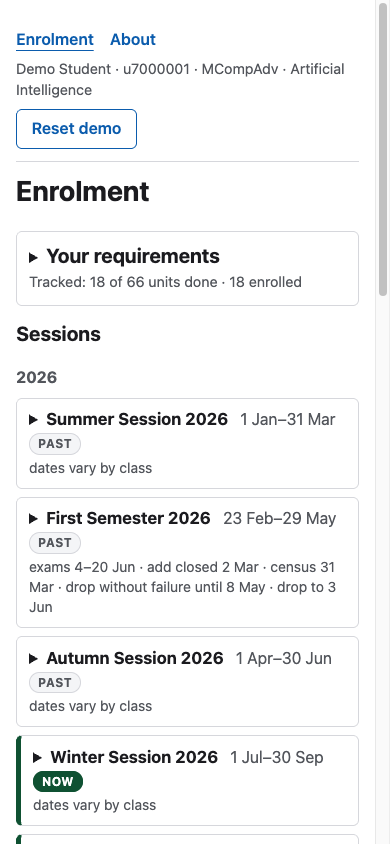
| A session list with no dates and no current or next marker. | Every session shows its dates and key deadlines (exams, add, census, drop), badged Now, Next or Upcoming. Deadlines within a fortnight count down (“drop without failure closes in 11 days”). Past sessions, and intensive sessions with none of your classes, fold away, so the semester you’re enrolling for sits near the top. |
| Enrolment Details replaces the list; changing session means backing out. | Each session is a disclosure row: its enrolment details unfold in place. |
| Class numbers only, looked up elsewhere. | A class number or a course code. A course with one class is added directly; a course with several opens an inline chooser showing each class’s mode and dates. |
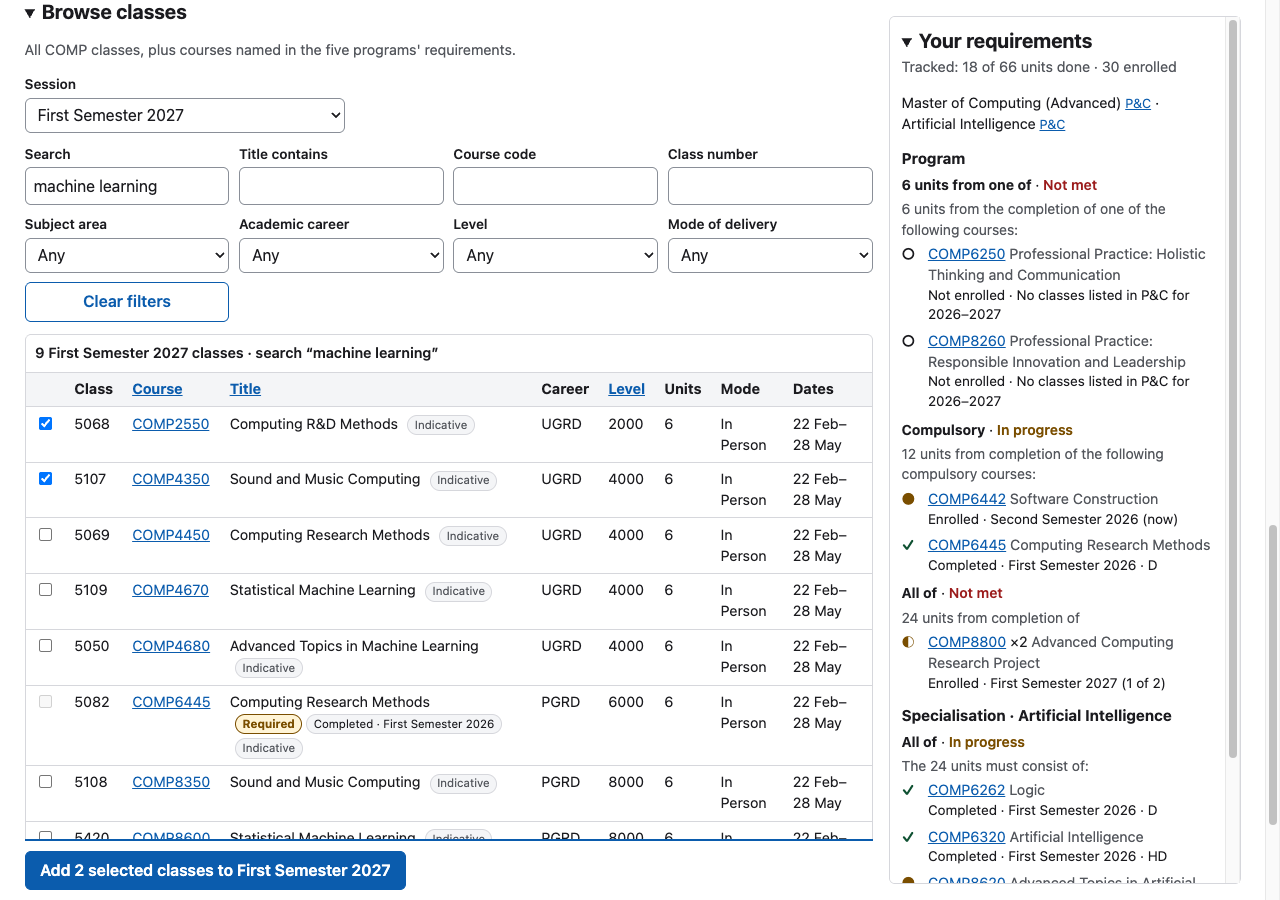
| Search needs a career and a subject area, and adds one class per click. | Every filter is optional, search covers codes, titles and descriptions, and several classes can be added at once. |
| Program requirements live on another site, as prose. | A sidebar tracks the program’s and major’s course lists, with each course’s status and a one-click Add. |
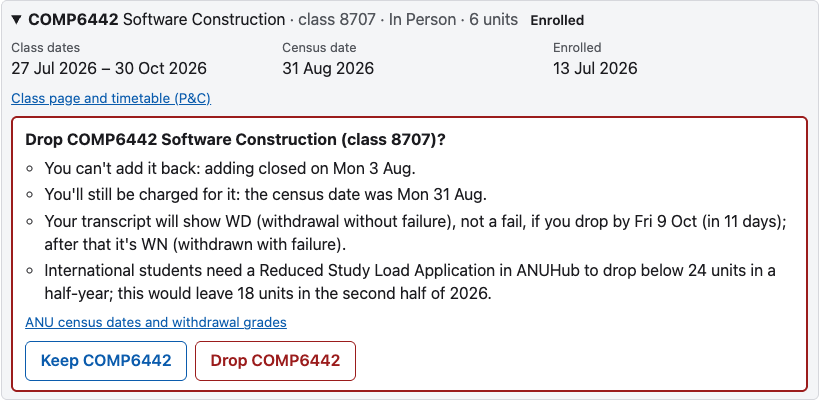
| ANU’s rules for dropping (census fees, WD and WN grades, the international 24-unit rule) sit on separate pages. | Once a class has started, Drop asks first, and the confirmation says what dropping now costs, from those rules and the class’s own dates. A class that hasn’t started drops in one click and leaves no record. |
| The permission-number box appears every time, whether or not a class needs a code (CBE’s guide). | A class is flagged only where ANUHub would ask this student for a code, with a link to how to get one. |
| Tutorials are chosen in a separate system, MyTimetable. | Each class links to its P&C class page and timetable, and a session with current or upcoming classes points to MyTimetable. |
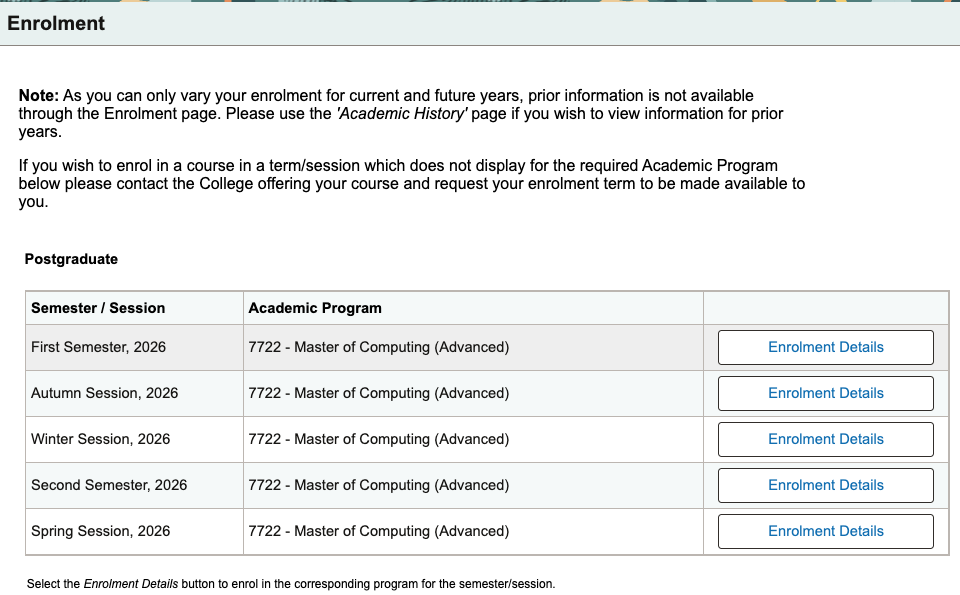
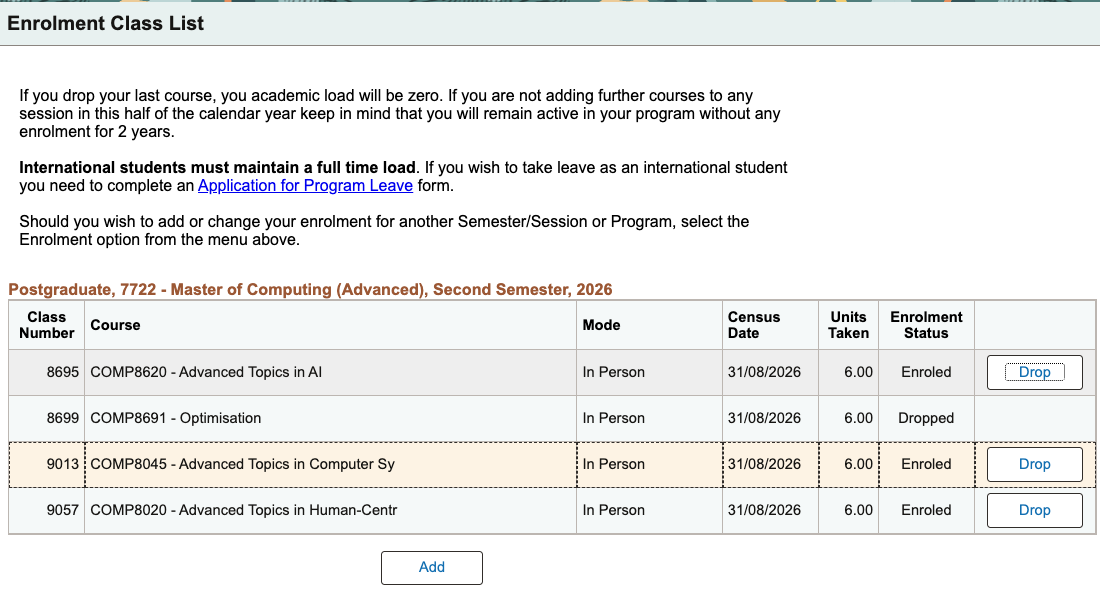
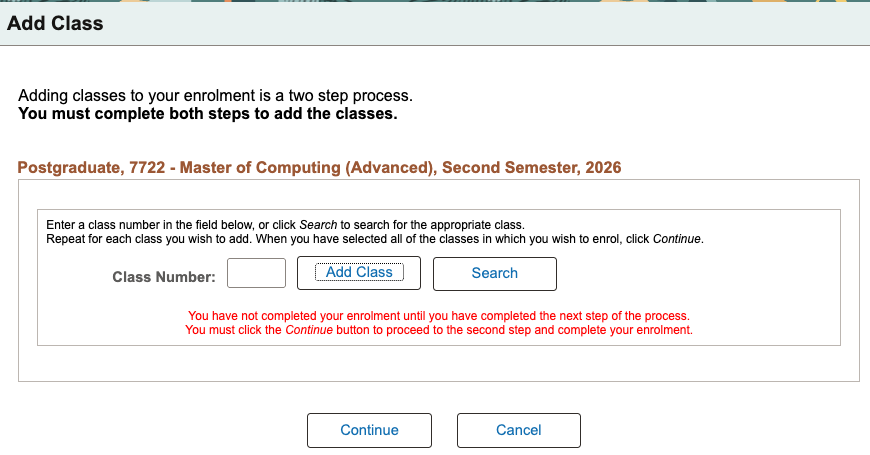
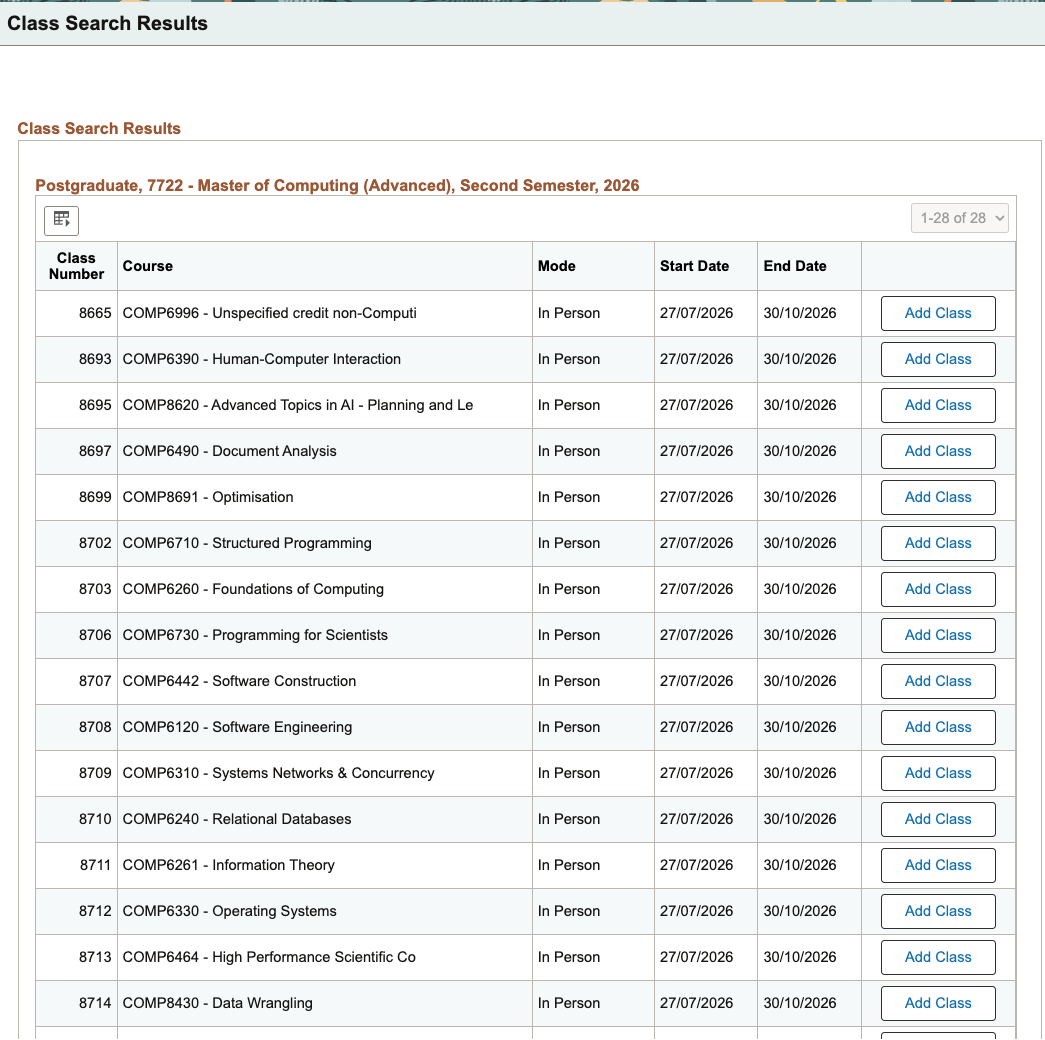
Before: crops of the live ANUHub pages, 24 September 2026, reproduced with the student’s permission.
What is enforced, and where. The rules above are pinned by contract
tests that run against the built server (spec/): the badges and dates, the
in-place details, every add path and its messages, the 24-unit cap, drop
deadlines, persistence across a reload, sandbox isolation, the catalogue’s
filters and links, the sidebar’s statuses, and that every course code on the
page exists in the snapshot. They also pin the folds, the countdowns, what
the drop confirmation says in each census window, where permission codes
apply, the class-page links, and where focus lands after each kind of write.
axe runs on every server-rendered state in the
suite, and a real-browser pass checked contrast, keyboard use and the phone
layout. Judgement calls that no test settles: the wording, which
requirement prose counts as a trackable course list, and the layout.
What it deliberately leaves out. Real sign-in, asking for or checking permission codes (the page only flags where ANUHub would ask), prerequisite checking (P&C publishes prerequisites only as prose, so the page shows them and doesn’t enforce them), undo (the reverse of an add is a drop), swap, overloads, fees, seats and waitlists, choosing tutorials (the page points to MyTimetable), and any rule in a program that isn’t a list of courses — those are shown verbatim under “Other rules, not tracked”.
Where the data comes from
- Programs & Courses (programsandcourses.anu.edu.au) is the source of
truth for courses, classes, dates, modes, topics and requirement lists. A
polite, cached crawler (
scripts/pc/) fetched it once on 24 September 2026, at the student’s direction, with an honest User-Agent and at most one request a second: every 2026–27 COMP course, five computing programs (Bachelor of Computing, both Advanced Computing honours degrees, and both Masters of Computing), five majors or specialisations each, and every course their requirements name. The normalised snapshot is committed insrc/data/pc/; its provenance, every override and every gap is recorded insrc/data/pc/README.md. The app never talks to P&C. - The university calendar supplies what P&C doesn’t: session spans, exam
periods and deadlines (
src/data/calendar.json, with the source on each row). - Offerings for 2027 are P&C’s own “indicative” list, and the page says so.
The demo student
There is no ANU sign-in. Each browser gets its own copy of a demo student —
u7000001, Master of Computing (Advanced) with the Artificial Intelligence
specialisation, part-way through 2026 — the moment it first changes something,
so visitors never see each other’s enrolments. The Reset button in the demo
settings bar starts the copy again. The student’s history uses real P&C
offerings; the grades are invented (src/data/templates/README.md).
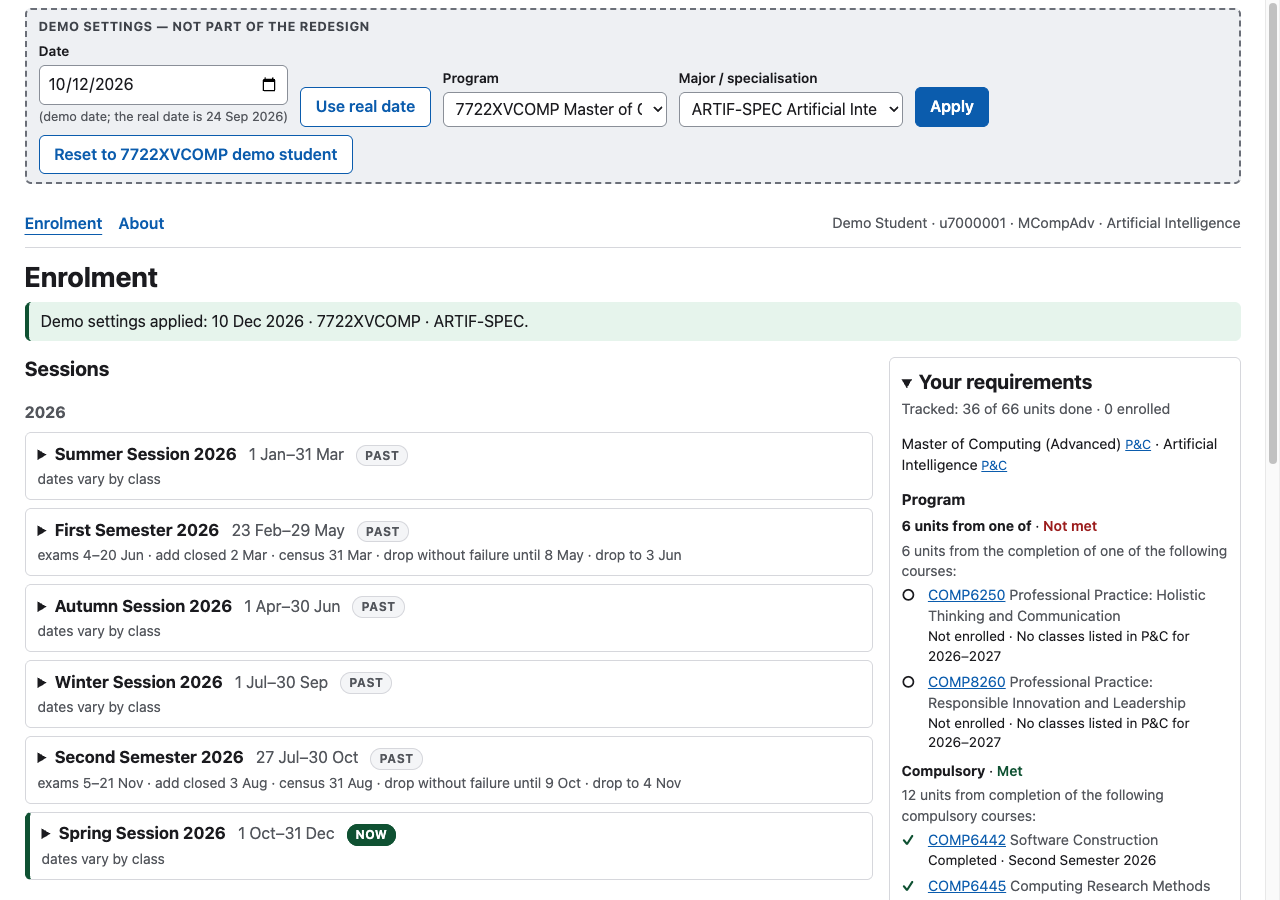
The demo settings bar (M2)
A crit audience can’t wait for a real semester to begin or enrol in a different degree, so a bar pinned above the page lets whoever is presenting change what the page is computed for. It is not part of the redesign. It is dashed, muted and labelled “Demo settings — not part of the redesign”, and a real student would never see it.
- Date. The page is computed as if it were that day: the Now/Next badges, whether adding and dropping are open, which classes count as completed, and the date new enrolments are stamped with. It runs from 1 January 2026 to 31 December 2027, the span of the loaded sessions. Use real date switches back to today in Canberra.
- Program and major/specialisation. Five computing programs with five majors or specialisations each, from P&C. Changing them changes the requirements sidebar and the career check on new enrolments. A pair the program doesn’t offer is refused.
- History is fixed. Settings never add, drop or regrade anything the student has taken. Only the reading of it follows the date: a class that has ended by then counts as completed, and one still running shows as enrolled.
- Reset loads the chosen program’s own demo student: five of them, one per program, each with a completed First Semester 2026, an enrolled Second Semester 2026 and a requirement left open for 2027. Reset keeps the date setting.
On phones the bar scrolls away with the page instead of staying pinned, because there it wraps to about 370 pixels.
Running it
pnpm install
pnpm dev                              # http://localhost:4321
pnpm check                            # type check, build, then every test
pnpm data:fetch && pnpm data:build    # refresh the P&C snapshot (network; about 4 minutes)
How it’s built
An Astro server renders the whole page for the visitor’s student and a React
island hydrates it; after that every change happens in place through a small
JSON API whose every write returns the full new view, so the page, the
validation and the sidebar can’t disagree. SQLite (Drizzle) holds the snapshot
and the sandboxes. The design is in
docs/superpowers/specs/2026-09-23-enrolment-redesign-design.md, the build plan
in docs/superpowers/plans/2026-09-24-enrolment-redesign.md, and the research
behind both in docs/research/.